 Play now
Steal Bots
Knock off rival robot arms, bolt them onto your bot and fight back.
- 2026 collection
- Plays in your browser, nothing to download
- Free to play, no sign-up
- Plays on computer, phone and tablet
About Steal Bots
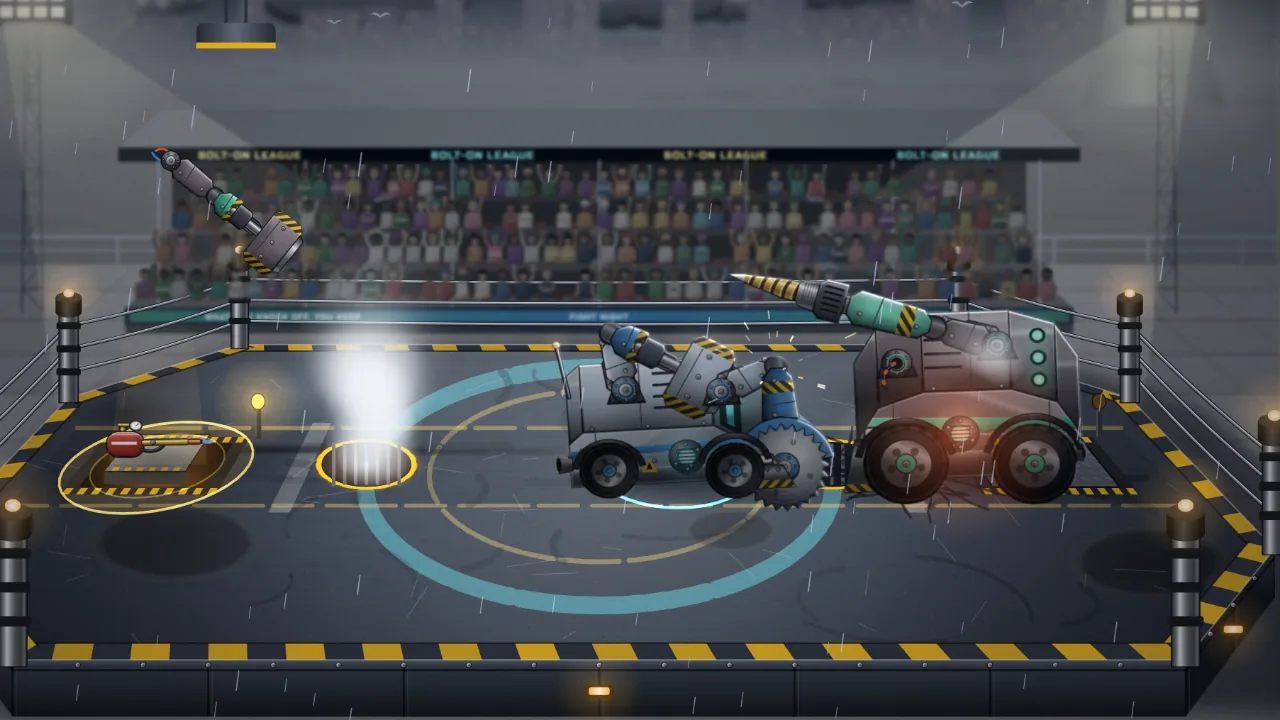
Steal Bots is a free robot fighting game by 2DQuest that you play right in your browser on a computer, phone or tablet, with no download or sign-up. It has one rule: whatever you knock off, you keep. You drive KIT, a rookie battle robot built from spare parts, forward and back along the lane of an octagon arena to strike, guard, parry and dodge.
Hit a rival's arm hard enough and it snaps off and lands on your side, ready to bolt onto your own machine, but every part can be picked up only once. Fresh tools rise from a lift hatch behind each robot: wrenches, crowbars, sledgehammers, chainsaws, blowtorches and nail guns, each with a special power you unleash when your power ring is full.
Boost out of big swings for a perfect dodge and strike in bursts, because mashing nonstop makes your machine overheat. Each of the 100 levels brings a new wheeled or tracked rival, a new arena and its own music track, with steam vents, a reversing conveyor belt, a magnet crane and a champion boss every tenth bout. Every win unlocks the next arena on the road to becoming the robot combat champion.
Questions about Steal Bots
- What is Steal Bots and who made it?
- Steal Bots is a free 2.5D robot fighting game made by 2DQuest. You battle 100 wheeled and tracked robot rivals one on one in an octagon arena, knock off their weapon arms and bolt them onto your own robot to fight back with them.
- How do you play Steal Bots?
- Drive your battle robot forward and back along the arena lane and strike to drain your rival's core battery to zero. Guard or dodge its big swings, knock off its weapon arms, and drive onto loose arms and tools to bolt them onto your own robot.
- How do you steal arms in Steal Bots?
- Hit a rival's guarding or swinging arm hard enough and it snaps off and lands on your side of the lane. Drive onto it, or click or tap it, to bolt it on. Each part can be picked up only once: if it falls off again, it turns to scrap.
- What are the controls?
- On a computer you pick Mouse or Keyboard on the start screen. With the mouse your robot drives forward or back to the pointer, left click strikes (hold to smash), a quick right click dodges (hold it to guard) and middle click unleashes your power. With the keyboard A and D (or the arrow keys) drive, J strikes, K guards, Space dodges and Q unleashes your power. On a phone slide the joystick left or right and use the STRIKE, GUARD, DODGE and POWER buttons. Tools rise from the lift hatch behind you and knocked-off arms land on your side: just drive onto them to bolt them on.
- Is Steal Bots free, and where can I play it?
- Yes, it is completely free. Steal Bots is played only on 2DQuest.com, at 2dquest.com/game/steal-bots, in any modern browser on a computer, phone or tablet, with no download or sign-up. On a touchscreen the controls switch to touch buttons, and your unlocked levels and bolts are saved on your device.
- How many levels does Steal Bots have?
- 100. Each level brings a new wheeled or tracked robot rival and a new arena with its own music track, and every tenth bout is a champion fight. Winning a level unlocks the next one, all the way to level 100.
- Any tips for beating tough robots?
- Strike in short bursts so you never overheat, dodge just as a big swing lands for a perfect dodge, and save each tool's power for the right moment: the wrench even repairs your arms.
- Is Steal Bots OK for kids?
- Steal Bots has no blood, gore or human fighters: only robot machines battle, and a knocked-out robot simply flips over. There is no chat and no sign-up.
- Can I record or stream Steal Bots?
- Yes. Videos, streams and screenshots are welcome on YouTube, Twitch, TikTok and other platforms, including monetized content. Please credit the game and 2DQuest.com, ideally with a link. The game can only be played on 2DQuest.com.
How to play
- Start screenchoose Mouse or Keyboard (switch any time in the pause menu)
- Mousepoint where you want to drive
- Left clickstrike (hold to smash)
- Right clickdodge
- Hold right clickguard
- Middle click, Q or click your portraitpower (when the gold ring is full)
- Click a tool or loose arm, or drive onto itbolt it on
- A / D or Left / Right arrowsdrive forward and back
- Jstrike (hold to smash)
- K or Shiftguard
- Spacedodge
- Qpower
- E next to a toolbolt it on
- Escpause
- Mmute
- Nmusic on or off
- Ffull screen
- Joystick (left side)drive forward and back
- STRIKE buttonstrike (hold to smash)
- GUARD buttonguard
- DODGE buttondodge
- POWER buttonpower
- GRAB button, or tap a toolbolt it on
- Tap the floordrive there